- AI share of voice is your brand's mentions divided by total mentions across every tracked brand, over the same fixed set of prompts and runs.
- It only means something relative to a stated prompt set, engine mix and run count. Change any of those between measurements and the number isn't comparable anymore.
- The formula is simple; the discipline of keeping the inputs fixed is the actual work.
- A single run gives a noisy share of voice. Multiple runs per prompt narrow that noise — see how many you likely need before trusting the number.
- Report it alongside visibility and sentiment, not alone — a high share of voice built on mostly neutral or negative mentions isn't the win it looks like in isolation.
What exactly is AI share of voice?
Your brand's share of every brand mention, across a fixed set of prompts, engines and runs. If you ask ten buyer-style questions and count every brand name that appears across all the answers, your share of voice is your count divided by the total count for all brands combined — not just the brands you chose to compare against, but everyone who showed up.
This is one of ContextOwl's four fixed metrics (alongside visibility, sentiment and position), and the definition doesn't change across contexts: it's always "your mentions over all mentions," calculated the same way whether you're reporting it to yourself, a boss, or a client.
How is it calculated, step by step?
- Fix your prompt set. Pick the buyer-style questions you'll track — five to ten is a reasonable starting range — and write them down exactly as asked. This set has to stay identical between measurements, or the comparison breaks.
- Fix your engine and run count. Decide which engine(s) you're measuring and how many times you'll run each prompt. One run per prompt is the minimum; more runs narrow the noise (see how many runs you actually need).
- Run every prompt and log every brand named in every answer — not just your brand and one or two rivals. A brand you didn't think to track still counts toward the total.
- Count total mentions per brand across all prompts and runs.
- Divide your brand's mention count by the sum of every brand's mention count. That ratio, as a percentage, is your share of voice for that specific prompt set, engine and run count.
Worked example. Five prompts, one engine, one run each — twenty-five total brand mentions across all five answers combined:
| Brand | Mentions | Share of voice |
|---|---|---|
| Your brand | 7 | 28% |
| Competitor A | 9 | 36% |
| Competitor B | 5 | 20% |
| Competitor C | 4 | 16% |
| Total | 25 | 100% |
Worked example with illustrative numbers — copy the structure, not the figures, into your own tracking sheet.
Copy this structure directly into a spreadsheet: one row per brand, one column per prompt (mention count for that prompt), a total column, and a share-of-voice column that divides each brand's total by the grand total. That's the entire template — the discipline is in keeping the prompt set, engine and run count fixed between measurements, not in the math itself.
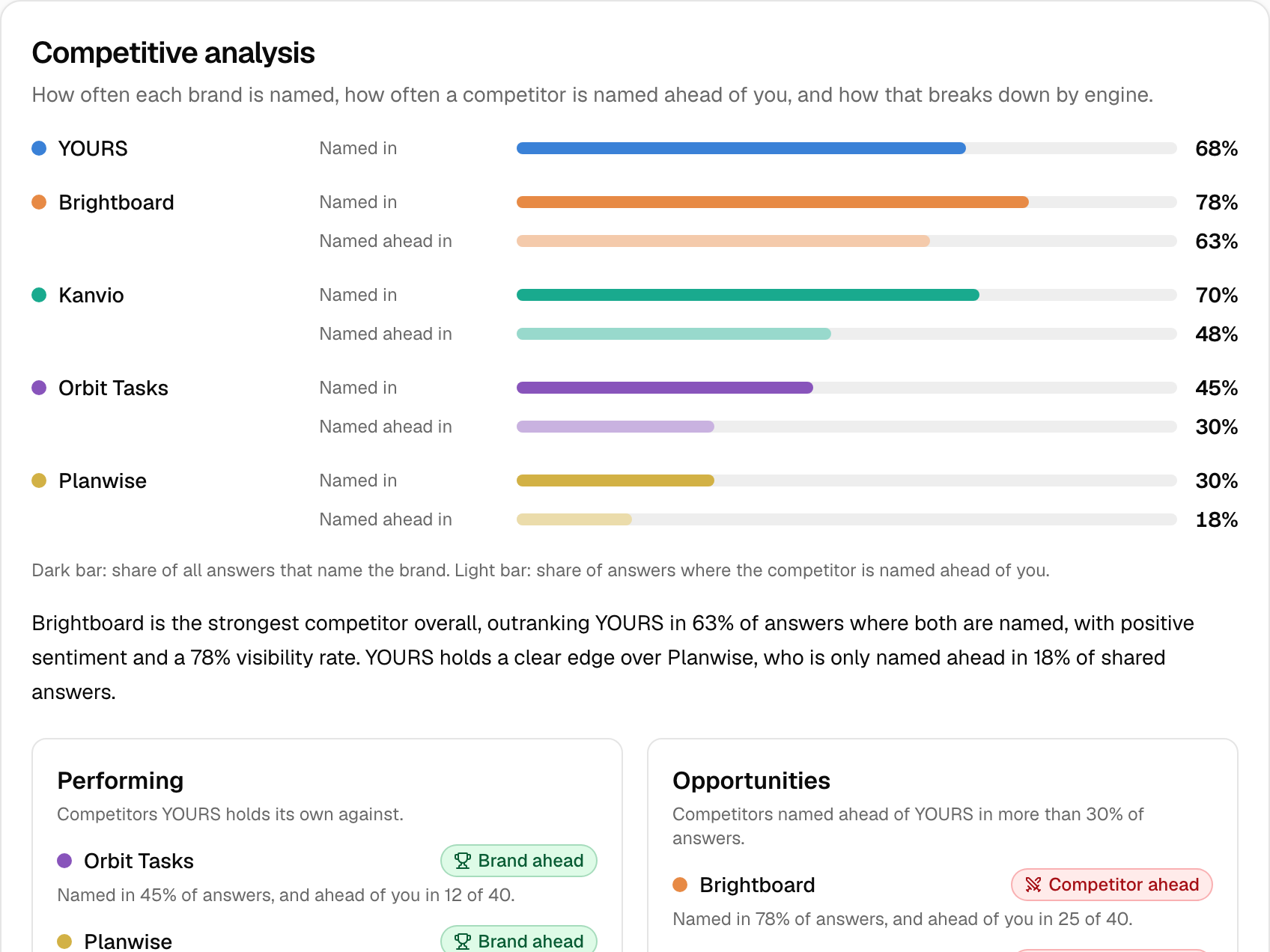
Here's what the same underlying idea looks like inside a full AI visibility report, where every named brand's rate is tracked side by side rather than hand-logged:
What goes wrong when engines or prompt sets are mixed?
Share of voice breaks silently the moment the inputs change between measurements, and the result still looks like a valid number — it just isn't comparable to the last one. Three specific ways this happens:
- Mixing engines mid-comparison. If last quarter's share of voice came from ChatGPT only and this quarter's includes Gemini and Perplexity too, the shift could be entirely due to the engine mix, not a real change in how often you're named. Report by engine, or hold the engine mix constant.
- Changing the prompt set. Swapping even one or two prompts changes which competitors are likely to appear at all, which moves everyone's share of voice regardless of any real change in visibility.
- Comparing different run counts. A one-run measurement and a ten-run measurement carry very different amounts of noise; treating them as equally reliable data points overstates your confidence in whichever one happened to look better.
How many runs are needed?
There's no fixed answer, but the direction is clear: more runs per prompt narrow the gap between what you observed and what's typical, because the same prompt doesn't reliably return the same brand list twice. A single run per prompt gives a real but noisy share-of-voice snapshot. Three to five runs per prompt, on the same engine, gives a meaningfully steadier read without requiring research-study resources. State your run count every time you report the number — "share of voice from 5 prompts × 3 runs on ChatGPT" is a specific, checkable claim; "our AI share of voice is 28%" with no method attached is not.
How to report it next to visibility and sentiment?
Share of voice alone can mislead. A brand can hold a high share of voice built mostly on neutral or unfavorable mentions — present often, but not positioned well. Report the three together:
| Metric | What it tells you | What it misses on its own |
|---|---|---|
| Visibility | How often you're named at all | Says nothing about your competitors' presence |
| Share of voice | Your slice of mentions relative to everyone else named | Says nothing about whether those mentions are favorable |
| Sentiment | Whether you're described positively, neutrally or negatively when named | Says nothing about how often you're named in the first place |
State plainly, every time you report it, that the number is a snapshot over the chosen prompts and runs — not a market-wide fact about your category. For the full four-metric framework this table draws from, see how to measure AI visibility. ContextOwl's own Competitor AI Comparison tool runs this exact comparison for you and a named rival on one engine, over a shared set of questions, as a fast way to see where you stand without building the spreadsheet by hand first.
FAQ
Is share of voice the same as visibility rate? No. Visibility rate is how often you're named, on its own. Share of voice is your mentions relative to every other brand named across the same prompts — a comparative measure, not a standalone frequency.
Do I need to track every competitor, or just my main rivals? Count every brand that actually appears in the answers, not just the rivals you expected. An unexpected name showing up repeatedly is itself useful information, and leaving it out of the total inflates everyone else's share.
Can I compare my share of voice across different months if my prompt set changed slightly? Only with caution, and you should say so in the report. A changed prompt set is a different measurement, not a trend line — note the change rather than presenting the comparison as apples to apples.
What's a "good" share of voice? There's no universal benchmark. It depends on how many brands typically appear in your category's answers and how many prompts you're tracking — compare your own number over time and against named competitors, not against an external standard nobody has published honestly.
What to do next
- Copy the worked-example table structure into a spreadsheet and fix your prompt set, engine and run count before your first measurement.
- Log every brand named in every answer, not just the ones you expected to see.
- Re-run with the identical inputs next time, and report the method (prompt count, engine, run count) alongside the number itself.
Try the Competitor AI Comparison tool to see this calculation run live for your brand against one named rival, on one engine, free.
Sources
- SparkToro and Gumshoe.ai, AI recommendation consistency study (600 volunteers, 12 prompts, 2,961 runs, November–December 2025), as reported by Search Engine Journal: https://www.searchenginejournal.com/ai-recommendations-change-with-nearly-every-query-sparktoro/566242/
- ContextOwl product definitions: four fixed metrics and report method.
More in Measurement
Bing was the first major engine to give publishers free citation data — total citations, cited pages, and the grounding queries behind them. Here's what it shows and what it doesn't.
Citation share is the slice of an answer's sources that are actually yours — not how often you're mentioned, and not the same thing as share of voice.
Perfect AI attribution doesn't exist. Teams that are measuring anything real rely on proxies: self-reported source, branded search lift, direct traffic, and sales-call mentions.